Payments and deposits
Open a booking and find Payments to see what the customer has paid, what they still owe for the rental, and how much security deposit you hold.
The rental and its security deposit have separate balances. A booking can be fully paid while its deposit is still waiting to be collected or returned.
Choose the right payment type
| Type | Use it for | Effect |
|---|---|---|
| Payment | Rental money received, including an advance payment | Reduces the rental balance |
| Deposit | A refundable security deposit received | Increases the deposit held; leaves the rental balance unchanged |
| Refund | Rental money returned to the customer | Reduces the rental money paid; can reopen a rental balance |
| Compensation | An additional payout to the customer, such as a goodwill payment | Appears as money paid out; leaves the rental balance unchanged |
Deposit Return appears when you record returning a deposit. It reduces the deposit held, separately from rental refunds.
To charge for fuel, cleaning, damage or a fine, add a custom charge in Pricing. Then collect the balance or settle it from the deposit. Compensation records money you pay out.
Read the balances
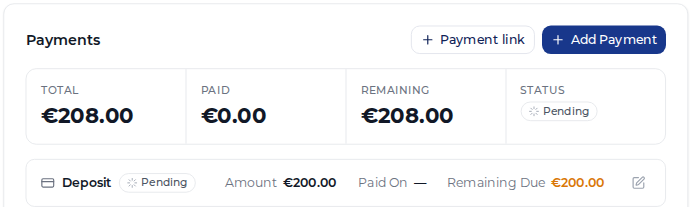
For a fixed-date booking, Total is the rental price, including its add-ons and charges. Paid is rental money received after rental refunds. Remaining is what is still owed for the rental.
The Deposit strip shows the configured deposit amount and what is held or still due. Changing that amount with its pencil icon changes the requirement. It does not record a payment.
Overpaid means the rental has received more than its total. If that money belongs to the security deposit, use Allocate to deposit. This moves it between the balances without collecting or returning money.
Nomora may split a manual payment automatically when it covers the rental balance plus an uncollected, configured deposit. Check the resulting transactions before adding a separate deposit entry.
Example: settle a fuel charge from the deposit
The rental costs €300. The customer pays €300 for the rental and €500 as a security deposit.
| Step | Rental total | Rental paid | Rental remaining | Deposit held |
|---|---|---|---|---|
| Record the rental payment and deposit | €300 | €300 | €0 | €500 |
| Add a €50 fuel charge in Pricing | €350 | €300 | €50 | €500 |
| Click Deduct €50 from deposit | €350 | €350 | €0 | €450 |
| Return €450 and record its return | €350 | €350 | €0 | €0 |
The deduction settles the charge using money already held. It creates matching deposit and rental entries. Return the remaining €450 using the deposit return steps.
Completing or cancelling a booking does not itself return money. Check both balances before closing the customer’s account.